
We Moved Your Recipes Out of Harm's Way!
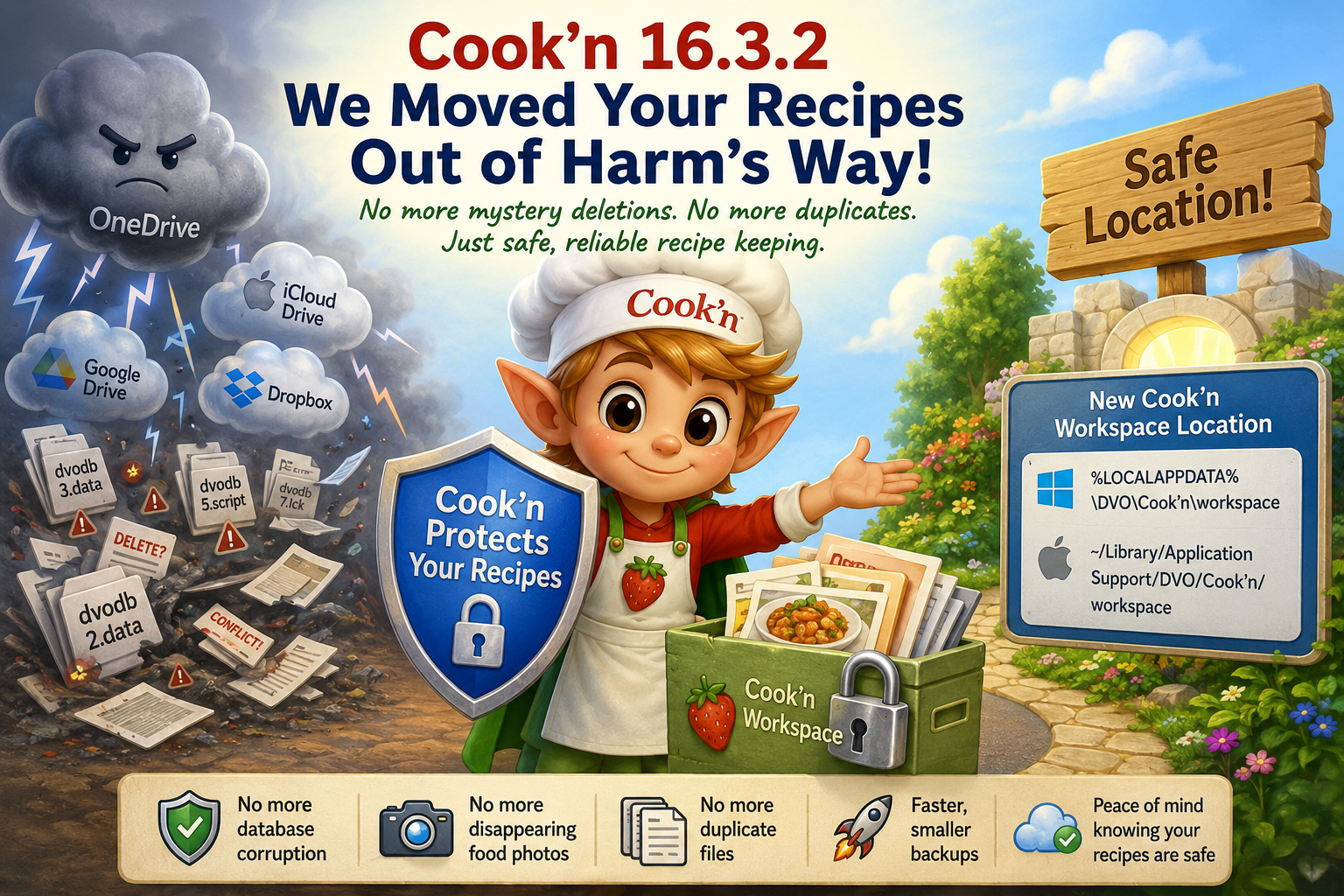
Yesterday, we released Cook'n Version 16.3.2 for Windows. The Mac update is scheduled to go live on Monday.
This update includes one of the most important recipe-protection changes we have ever made.
And, believe it or not, it all started with disappearing food photos.
Wait...where did my food photos go?
Over the past few months, we started receiving strange reports from Cook'n users who said their food photos were disappearing.Fortunately, many of these customers had Cook'n Cloud accounts, so their photos were safely backed up online. We were able to restore them.
But then, a few weeks later...poof! The photos disappeared again.
That was our first clue that something outside of Cook'n was messing with the files.
The Culprit: “Helpful” Sync Software
After several remote connect sessions, we discovered that OneDrive, iCloud Drive, Google Drive, Dropbox, and other sync services were interfering with Cook'n recipe files.These services are supposed to help by keeping your files backed up and synchronized. And, for normal documents, spreadsheets, and photos, they can be very useful.
But Cook'n's recipe database is not a normal document. It is a live, active database. Cook'n is constantly reading from it, writing to it, saving photos, updating indexes, making backups, and keeping everything organized.
When a cloud sync service jumps in and starts copying, locking, duplicating, deleting, or “helpfully” replacing files in the background, bad things can happen.
And this problem is not unique to Cook'n.
Quicken recently published a warning to their users explaining that OneDrive can cause errors, missing transactions, and data getting out of sync when Quicken data files are stored in OneDrive. In other words, we are not alone!
Click here to read Quicken's OneDrive warning
Greg, “The Silver Chef”
One Cook'n user I worked with personally was Greg, “The Silver Chef.”Greg uses Cook'n on his Mac, and his iCloud backup software kept removing his Cook'n food photos from his file system for no apparent reason.
During a remote connect session, I discovered a bunch of duplicate files in his Cook'n folder. In fact, when I tried to open a simple Cook'n log file, macOS displayed a message that said:
“Modifications aren’t in sync. Choose which versions to keep.”Seriously?
If you can’t even open a log file without the operating system asking you which version you want to keep, what the heck??
That is not a Cook'n problem. That is a cloud-sync-gone-wild problem.
A Picture Is Worth a Thousand Words
Here is a screenshot from one customer's computer showing the kind of duplicate files we were finding: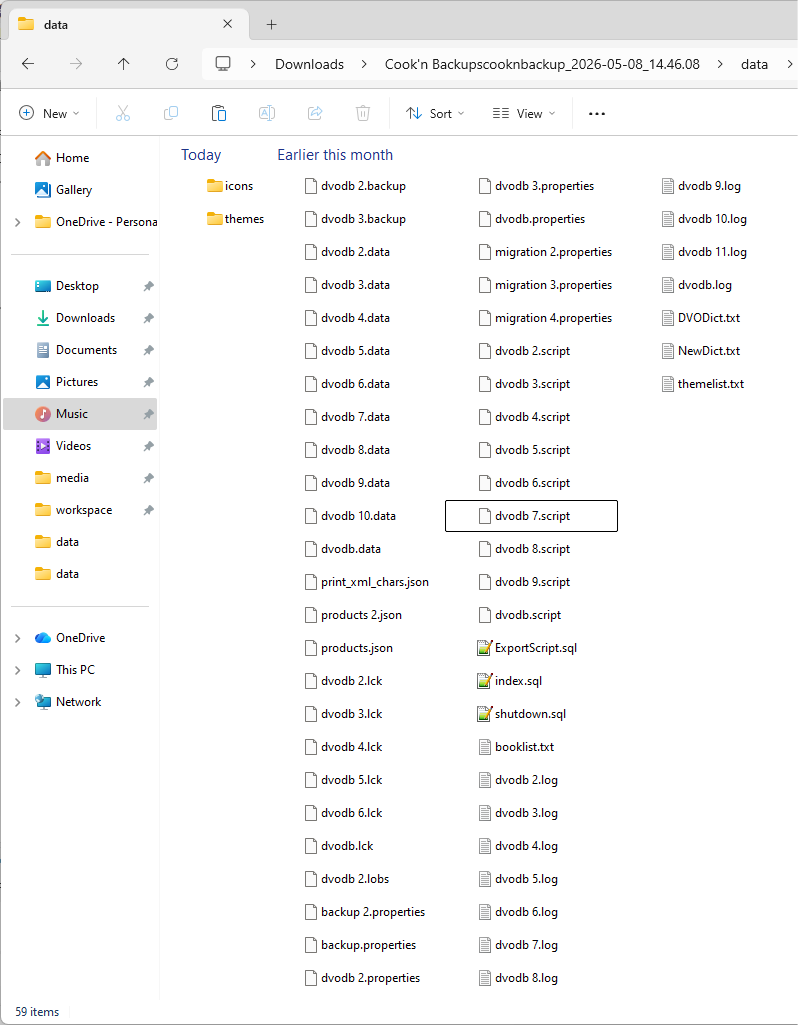
Instead of one clean recipe database, there were duplicate files all over the place:
- dvodb.data
- dvodb 2.data
- dvodb 3.data
- dvodb 4.data
- dvodb 5.data
- and on and on and on...
Not only can these duplicate files create confusion and corruption, they also make Cook'n backups slower and larger because Cook'n ends up backing up a bunch of junk files that should not even exist.
So We Fixed It
In Cook'n 16.3.2, we moved the most important folder, the Cook'n workspace folder, out of Documents and into a safer location.The workspace folder is where your Cook'n recipe database lives. This folder is not intended to be a user-facing folder. Cook'n uses it behind the scenes to store your recipes, food photos, cookbook data, indexes, and other important information.
On Windows, Cook'n now stores the workspace folder here:
%LOCALAPPDATA%\DVO\Cook'n\workspaceOn Mac, Cook'n stores the workspace folder here:
~/Library/Application Support/DVO/Cook'n/workspaceThese are the proper places for application data. Best of all, OneDrive, iCloud Drive, Google Drive, Dropbox, and other sync services are much less likely to interfere with Cook'n there.
What Stayed in Documents?
We did not move everything.Some Cook'n folders are useful to have in Documents because they are easy for you to access. So we left those alone.
- Cook'n Backups stays in Documents so you can easily find your local backup files.
- Cook'n\Download stays in Documents so you can save .dvo cookbook files there and let Cook'n import them automatically.
- Cook'n\Recipe Archive stays in Documents so imported .dvo files can be moved there after Cook'n imports them.
- Cook'n\HTML_files stays in Documents so recipes exported to HTML are easy to find.
What Will You See?
When you launch Cook'n after installing this update, Cook'n may display a message letting you know that your recipe database is being moved to a safer location.This is a one-time process.
Cook'n will:
- Back up your recipes
- Move the workspace folder
- Update Cook'n so it knows where your recipes live
- Launch normally
Only better.
Why This Is Good News
This update helps protect your recipes from:- Disappearing food photos
- Duplicate database files
- Cloud sync conflicts
- Database corruption
- Slow, bloated backups
That makes me very happy.
Your Recipes Are Too Precious to Risk
The crazy thing about this problem is that it was not caused by a virus. It was not caused by a hacker. It was not caused by some shady piece of software downloaded from the dark corners of the internet.It was caused by products from Microsoft, Apple, Google, and other major companies that are supposed to help people.
And that is exactly why having a Cook'n Cloud backup is so important.
You just never know what might be lurking out there that could foul up your recipe database. If something as ordinary as OneDrive or iCloud Drive can cause problems, imagine how important it is to have your recipes safely backed up in the Cook'n Cloud.
If you are not already a Cook'n member, I strongly encourage you to join today so your recipes can be backed up safely in the Cook'n Cloud.
Click here to choose a Cook'n Membership Plan
We’ve Got Your Back
We are always listening. We are always learning. And we are always working to make Cook'n better, safer, faster, and more reliable.Your recipes matter.
Your memories matter.
And we are going to keep doing everything we can to protect them.
Happy Cooking!
 Dan Oaks
Founder of DVO Enterprises
Creator of Cook'n
Grandfather of 5. Father of 5. Husband of 1.
Monthly Newsletter Contributor since 2024
Email the author! dan@dvo.com