
You Asked...We Made It Easier to Add Links!
A few weeks ago, we showed you a handy trick for adding clickable links to your Cook'n recipes .
For example, maybe your recipe was inspired by something you found online, and you'd like to include a link back to the original recipe. Or maybe you'd like to link to a helpful video, a related recipe, or anything else on the web.
There was just one little catch...
You had to add a bit of HTML code to your recipe.
After reading that article, longtime Cook'n user Linda Dehaven left this comment:
| "A wonderful new option would be to have these somehow added to the Edit/Insert menu. I always have to look up the source code and I'd definitely need to add this new one. Thanks!!" |
I replied:
"Great thinking, Linda D!"
And then I assigned a programmer to do it! 😊
Well, Linda...it's done!
Now, in the Cook'n Desktop App, simply place your cursor where you want the link and select:
Edit → Insert → Link
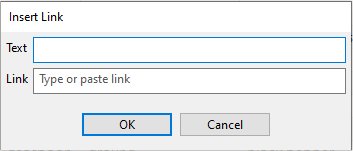
A little window will pop up asking for two things:
Text: What you want the clickable words to say
Link: The web address you want those words to open
For example, you could enter:
Text: Watch the video
Link: [the web address for your video]
Click OK, and Cook'n automatically inserts all that pesky HTML code for you!
Then, when you switch to View Recipe, your text becomes a clickable link.
No HTML to remember. No source code to look up.
Just Edit → Insert → Link.
And here's my favorite part about this little improvement: it came directly from one of you.
So keep those suggestions coming! We really do read them. And sometimes, like this time, a great idea from a Cook'n user turns into a brand-new feature just a few days later. 😊
Thanks for the great idea, Linda!
 Dan Oaks
Founder of DVO Enterprises
Creator of Cook'n
Grandfather of 5. Father of 5. Husband of 1.
Monthly Newsletter Contributor since 2024
Email the author! dan@dvo.com