
One Small Feature, One Big Family Dinner Miracle
If you’ve recently moved from MasterCook to Cook’n, you may have noticed something a little… overwhelming.
Categories.
So. Many. Categories.
In MasterCook, Categories live inside individual cookbooks. In Cook’n, Categories are global. That means when MasterCook users import their recipes into Cook’n, they often end up with dozens of Categories that are nearly identical in name.
“Pie”
“Pies”
“Pie Recipes”
“Desserts – Pie”
Sound familiar?
Up until now, cleaning that up meant a lot of manual work. You had to copy and paste recipes from one Category to another, delete the recipes from the old Category, and then delete the empty Category. It worked, but it wasn’t exactly fun.
So… we fixed it. 🙂
We added a new feature to Cook’n that makes consolidating Categories fast and painless. You can now Shift-click to select multiple recipes, then drag and drop them from one Category to another.
That alone is a big win. But here’s the magic part…
When Cook’n detects that you’ve dragged all of the recipes out of a Category, it will ask if you’d like to delete that Category for you.
Three steps. One move.
For example, in the screen recording below, I have a Category called “Pie” with 163 recipes in it, and another Category called “Pies.” Since those Categories are basically the same thing, I simply Shift-click to select all the recipes, drag them from one Category to the other, and drop them.
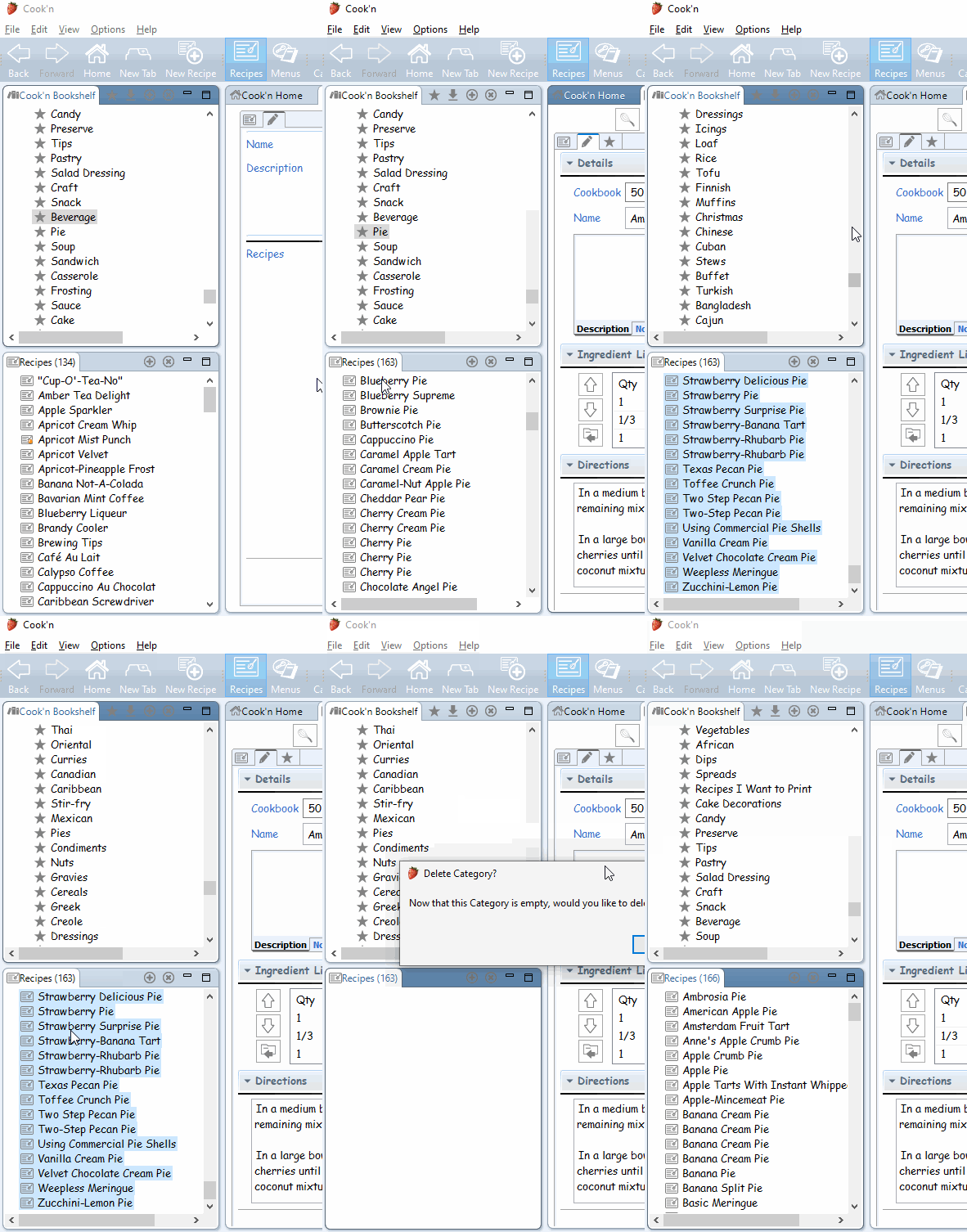
As soon as the original Category is empty, Cook’n pops up a dialog asking if I’d like to delete it.
Wow. Nice.
Way to go, Cook’n Elves.
Easy peasy lemon squeezy. 🍋
Now… speaking of things disappearing faster than expected…
A couple of weeks ago, we completely ran out of food at Sunday dinner. 😬
Kathy made a HUGE, MASSIVE pan of Chicken Dorito, and we figured that would be plenty. The only problem is that our kids are terrible at responding to text messages, so we had no idea who was actually coming for dinner (seriously… who raised these kids anyway?).
As it turns out—everyone came.
All of our kids.
Their families.
My brother and his family.
Brennah’s former roommate Britt and her husband.
Carson’s girlfriend and her dad.
People just kept showing up.
Before going to bed that night, Kathy counted everyone up. There were 38 people at dinner.
And here’s where the miracle happened.
The day before, I had picked up two roasted chickens from Costco. When I got home, I pulled out the electric knife, carved them up, and put the meat in a Tupperware container in the fridge. The truth is, I wasn't even sure why I bought two of them (other than that they were only $5 each...heck! If they're gonna give them away, I'll take'em!!).
As people arrived in waves, Kathy quietly slipped into the kitchen, pulled out that chicken, and somehow whipped up an entire second pan of Chicken Dorito.
Boom. Dinner saved.
Not a single person went hungry. Nobody missed out. Later, I said "that was amazing! How did you do that?" She said "I used the chicken you got from Costco yesterday!" It honestly felt like the loaves and fishes story unfolding right in our kitchen.
Needless to say, we love our family, and we love Sunday dinners together. That night, the house was buzzing with laughter and stories from the week, kids running everywhere, and plates piled high.
And yes—everyone loved Kathy’s Chicken Dorito. ❤️
Want the recipe?
Click here to view Kathy's Chicken Dorito recipe.
 Dan Oaks
Founder of DVO Enterprises
Creator of Cook'n
Husband of 1. Father of 5. Grandpa of 4.
Monthly Newsletter Contributor since 2024
Email the author! dan@dvo.com