
Welcome, MasterCook friends!
MasterCook is now part of the Cook'n family. You'll continue to receive the MasterCook Newsletter while we introduce you to new recipes, cooking tips, and features available in Cook'n.
Cook'n's NEW My Recipes View is Here!
You are going to LOVE what we just did to My Recipes!
We just released a new version of Cook'n for iPhone and iPad, and one of the most-used parts of the entire app has received a MAJOR makeover!
It's the My Recipes screen...and almost everything about it is better.
I made a 6-minute video to show you what's new. And to make the difference really easy to see, I put Kathy's phone, running the previous version of Cook'n, right next to my phone with the new version.
The difference is amazing!
It worked. But the Cook'n Elves insisted that we make it better.
Check out the old (left) compared to the new (right)...What do you think?
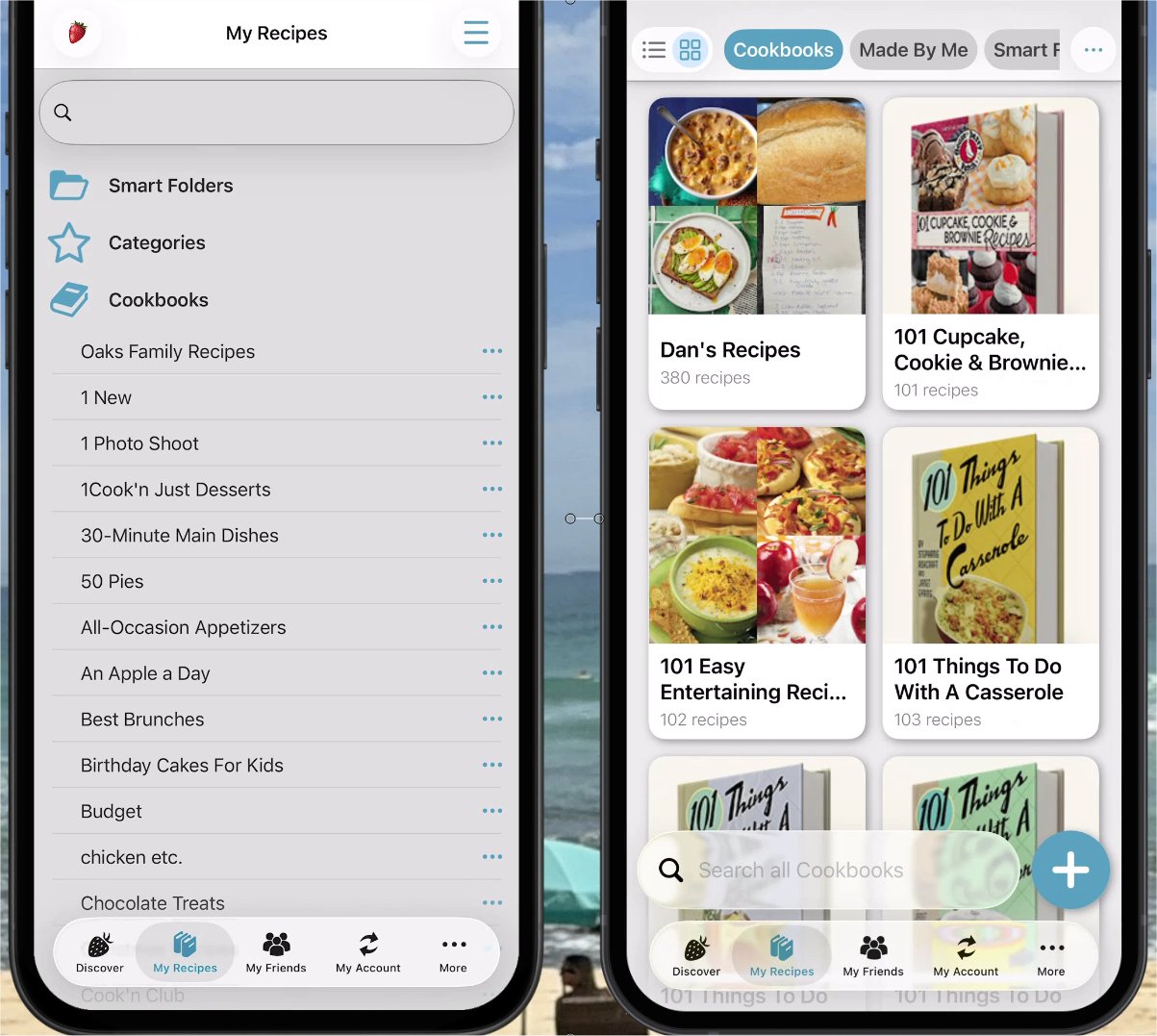
Now your cookbooks come alive with beautiful images!
You can choose between two different ways of viewing them. Bars gives you a streamlined list with a cookbook image beside each cookbook, while Boxes displays larger images in a beautiful graphical grid.
Just tap the little toggle in the upper-left corner and choose whichever view you prefer.
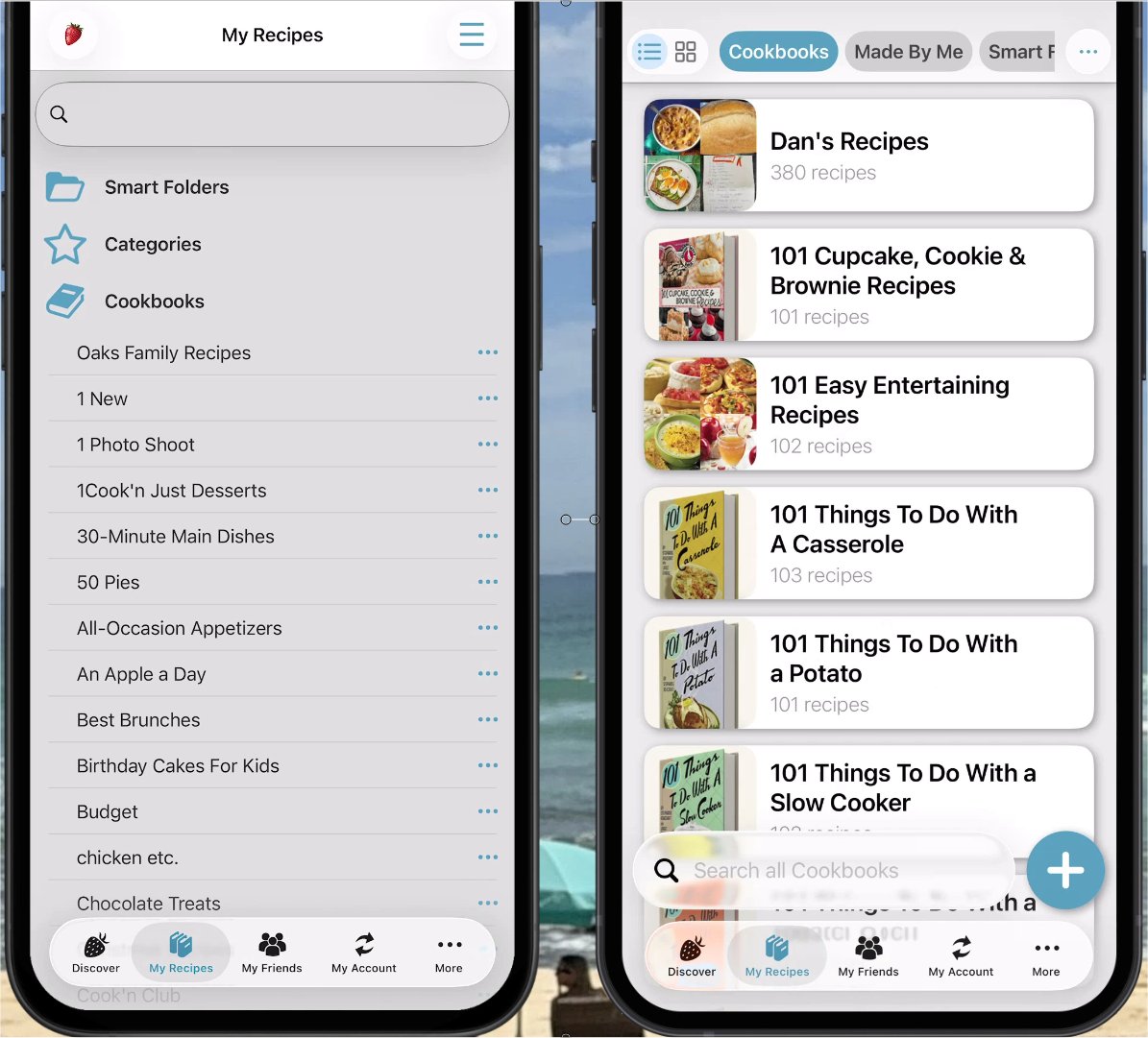
And this doesn't just apply to cookbooks. You can enjoy the same beautiful graphical experience as you browse through your chapters and recipes too.
Now you'll see a row of "pills" across the top of the screen. Swipe them left or right and tap Smart Folders, Categories, or whichever section you want to see.

Then, instead of looking at a plain list of text, you'll see your content represented visually with recipe images.
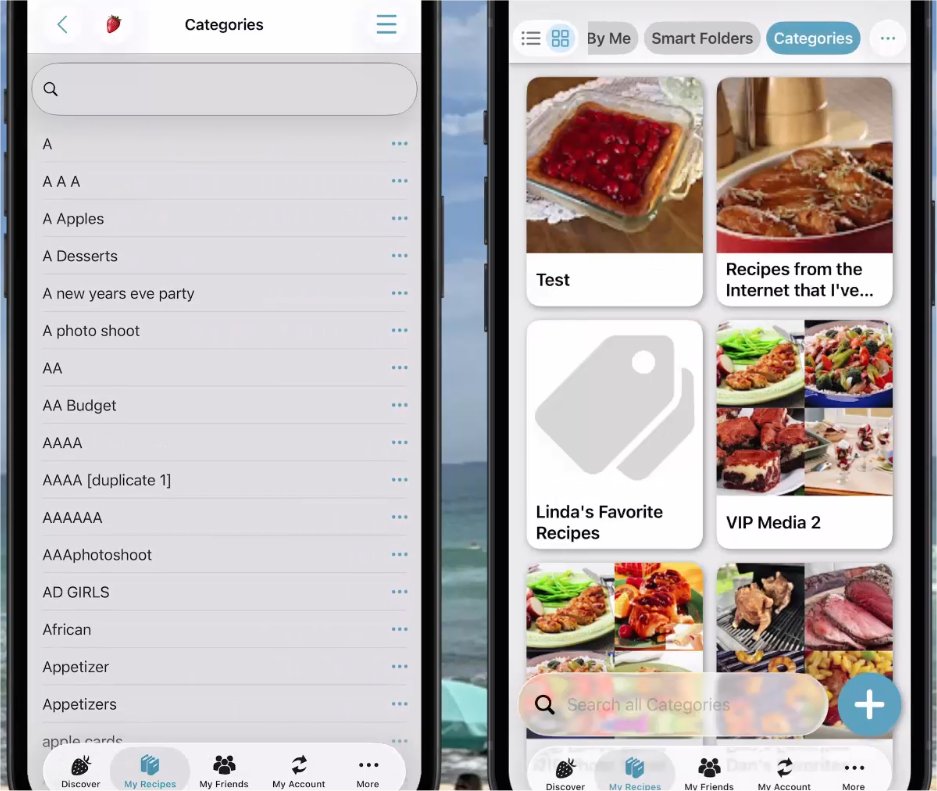
What a difference!
We've had the I Made This button in Cook'n for a while. When you make one of your recipes, you can tap it and share what you made with other Cook'n users in the Recently Made section of Discover.
But there was something missing...
How do you easily find all those recipes you've made later?
Now you can!
Tap the new Made By Me pill and Cook'n shows you all the recipes you've made.
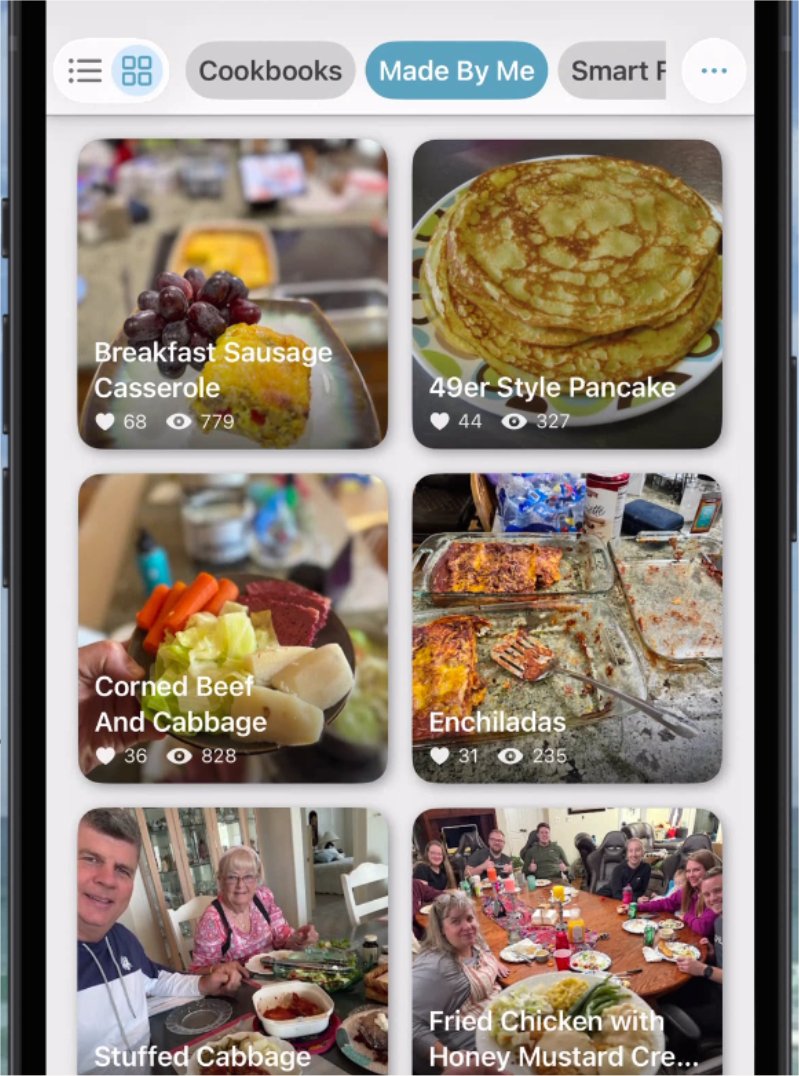
But we didn't stop there.
Cook'n also shows you how many Likes and Views each of those recipes has received!
In the video, I sorted mine by Likes and discovered that my Breakfast Sausage Casserole is my most-liked recipe with 68 Likes and 779 Views!
I had no idea!
You can sort your Made By Me recipes by date, Likes, Views, or alphabetically. It's a fascinating new way to rediscover your favorites and see which of your recipes other Cook'n users have enjoyed too.
View A-Z temporarily puts everything in alphabetical order so you can quickly find what you're looking for.
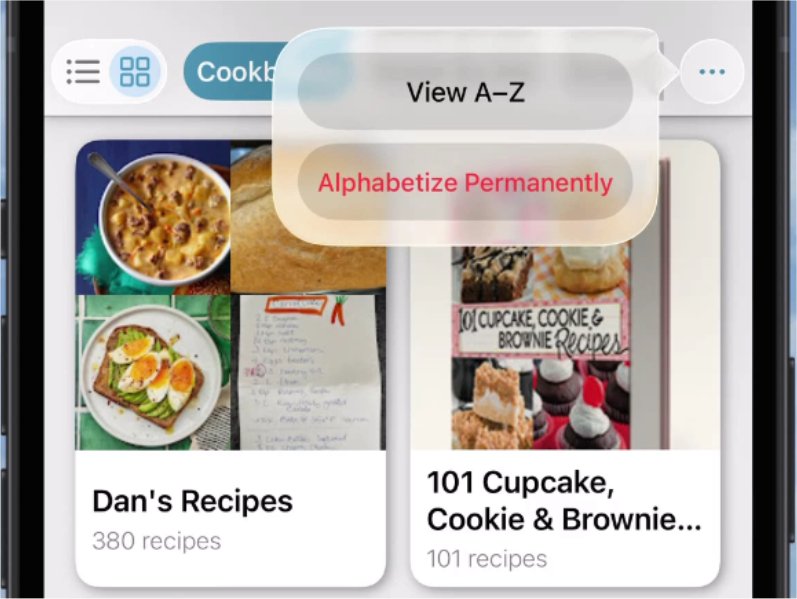
Turn it off, and everything goes right back to the order you had before.
That's the option I like because I want Dan's Recipes at the top of my cookbook list. I can temporarily alphabetize everything when I need to find something, then switch right back.
If you really DO want to change the order permanently, you can choose Permanently Alphabetize instead.
Best of both worlds!
Cook'n can now search through tens of thousands of recipes in a fraction of a second!
And the search results look just as beautiful as the rest of the new My Recipes experience, complete with the new Bars and Boxes viewing options.
You'll also notice that the Search bar has moved to the bottom of the screen where it's easier to reach.
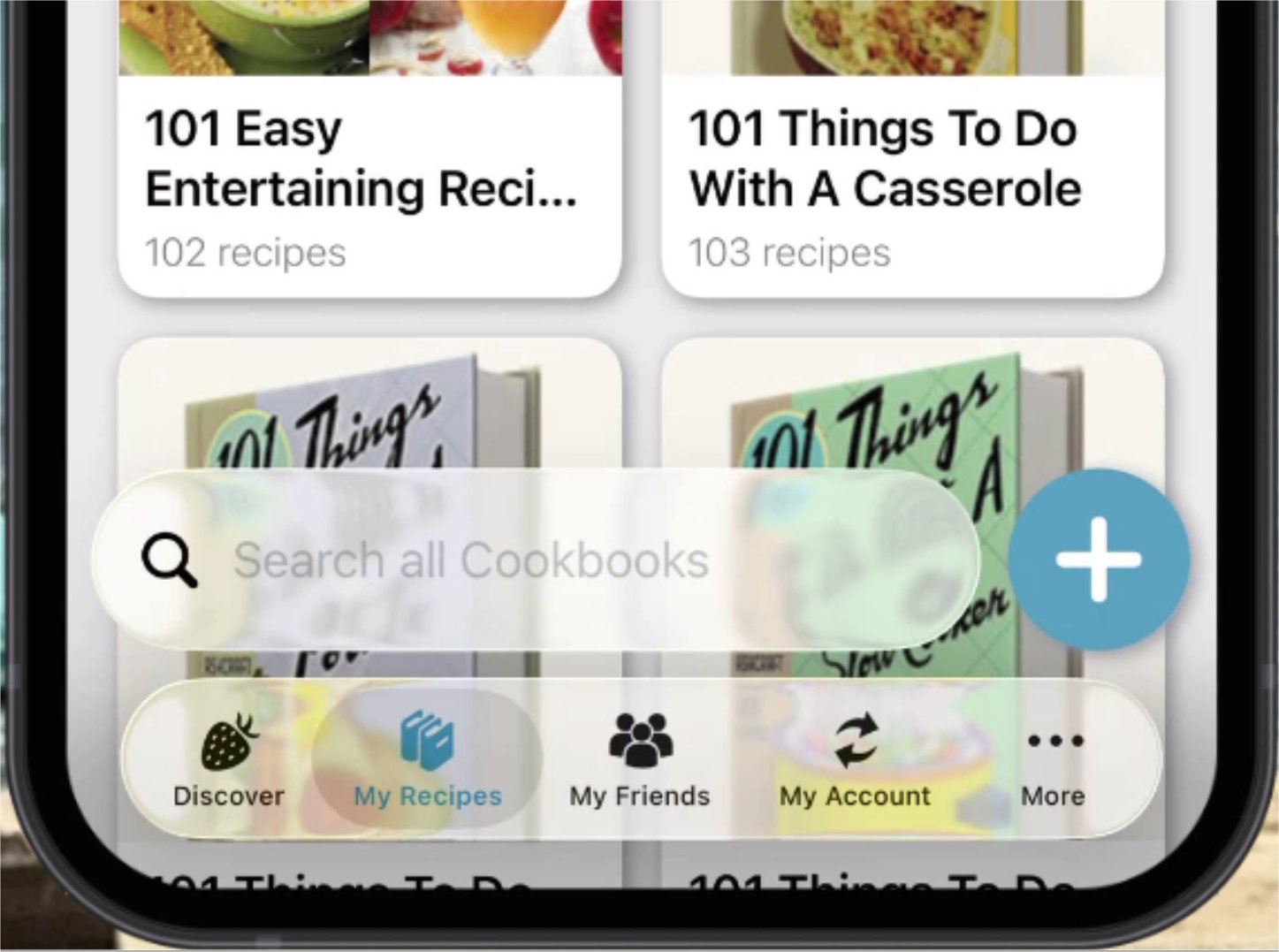
As you scroll down, both the Search bar and title bar get out of your way so you can see more of your recipes. Scroll back up and they reappear automatically.
It's a little thing...but once you use it, you'll appreciate the extra space!
Previously, if you wanted to manually add a recipe, you had to navigate into My Recipes, open a cookbook, open a chapter, open the More Options menu, and THEN choose New Recipe.
That's way too much work!
Now there's a big + button floating at the bottom of My Recipes.
Tap it anytime and you have instant access to:
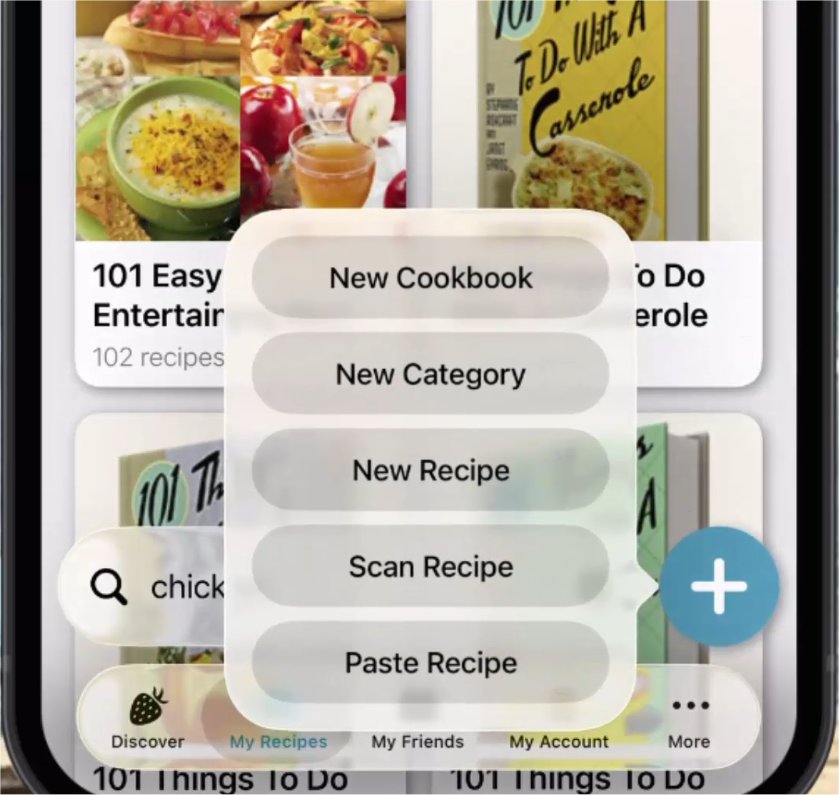
No digging through menus. No navigating into a cookbook first.
Just tap + and GO!
If you haven't watched the video yet, be sure to take a few minutes and see the old and new versions side-by-side. You'll see exactly how all of these new features work.
If you use Cook'n on your iPhone or iPad, make sure you're running the latest version and then go take the new My Recipes view for a spin.
I think you're going to LOVE it!
We had a fishes & loaves miracle at the reception when it looked like we were going to run out of spaghetti sauce. More people came than expected and they were making heaping plates of food (...which is understandable considering that Kathy prepared the food and it was delicious!)! Kathy's sister raced to the store to buy more sauce but, fortunately, amazingly, miraculously...it wasn't needed after all. Prayers were answered!
We just released a new version of Cook'n for iPhone and iPad, and one of the most-used parts of the entire app has received a MAJOR makeover!
It's the My Recipes screen...and almost everything about it is better.
I made a 6-minute video to show you what's new. And to make the difference really easy to see, I put Kathy's phone, running the previous version of Cook'n, right next to my phone with the new version.
The difference is amazing!
Your Cookbooks Aren't Just a List Anymore
In the previous version, tapping My Recipes displayed your cookbooks primarily as a list of text.It worked. But the Cook'n Elves insisted that we make it better.
Check out the old (left) compared to the new (right)...What do you think?
Now your cookbooks come alive with beautiful images!
You can choose between two different ways of viewing them. Bars gives you a streamlined list with a cookbook image beside each cookbook, while Boxes displays larger images in a beautiful graphical grid.
Just tap the little toggle in the upper-left corner and choose whichever view you prefer.
And this doesn't just apply to cookbooks. You can enjoy the same beautiful graphical experience as you browse through your chapters and recipes too.
Smart Folders and Categories Got a Makeover Too!
Remember how Smart Folders and Categories used to appear near the top of the My Recipes list?Now you'll see a row of "pills" across the top of the screen. Swipe them left or right and tap Smart Folders, Categories, or whichever section you want to see.
Then, instead of looking at a plain list of text, you'll see your content represented visually with recipe images.
What a difference!
NEW: Made By Me
This might be one of my favorite additions.We've had the I Made This button in Cook'n for a while. When you make one of your recipes, you can tap it and share what you made with other Cook'n users in the Recently Made section of Discover.
But there was something missing...
How do you easily find all those recipes you've made later?
Now you can!
Tap the new Made By Me pill and Cook'n shows you all the recipes you've made.
But we didn't stop there.
Cook'n also shows you how many Likes and Views each of those recipes has received!
In the video, I sorted mine by Likes and discovered that my Breakfast Sausage Casserole is my most-liked recipe with 68 Likes and 779 Views!
I had no idea!
You can sort your Made By Me recipes by date, Likes, Views, or alphabetically. It's a fascinating new way to rediscover your favorites and see which of your recipes other Cook'n users have enjoyed too.
Want Everything Alphabetical? Now You Have TWO Choices!
We also added two new options when viewing your Cookbooks, Chapters, and Recipes:View A-Z temporarily puts everything in alphabetical order so you can quickly find what you're looking for.
Turn it off, and everything goes right back to the order you had before.
That's the option I like because I want Dan's Recipes at the top of my cookbook list. I can temporarily alphabetize everything when I need to find something, then switch right back.
If you really DO want to change the order permanently, you can choose Permanently Alphabetize instead.
Best of both worlds!
Search Is BLAZING Fast!
We did some serious work under the hood too.Cook'n can now search through tens of thousands of recipes in a fraction of a second!
And the search results look just as beautiful as the rest of the new My Recipes experience, complete with the new Bars and Boxes viewing options.
You'll also notice that the Search bar has moved to the bottom of the screen where it's easier to reach.
As you scroll down, both the Search bar and title bar get out of your way so you can see more of your recipes. Scroll back up and they reappear automatically.
It's a little thing...but once you use it, you'll appreciate the extra space!
Adding a Recipe Is SO Much Easier!
This may be the change you'll appreciate most often.Previously, if you wanted to manually add a recipe, you had to navigate into My Recipes, open a cookbook, open a chapter, open the More Options menu, and THEN choose New Recipe.
That's way too much work!
Now there's a big + button floating at the bottom of My Recipes.
Tap it anytime and you have instant access to:
New Cookbook • New Category • New Recipe • Scan Recipe • Paste Recipe
No digging through menus. No navigating into a cookbook first.
Just tap + and GO!
Update Cook'n and Give It a Try!
There are so many improvements packed into the new My Recipes view that screenshots really don't do it justice.If you haven't watched the video yet, be sure to take a few minutes and see the old and new versions side-by-side. You'll see exactly how all of these new features work.
If you use Cook'n on your iPhone or iPad, make sure you're running the latest version and then go take the new My Recipes view for a spin.
I think you're going to LOVE it!
Wedding was Awesome!
And, on a totally unrelated note...in case you're curious...the wedding I told you about a couple weeks ago was awesome!!We had a fishes & loaves miracle at the reception when it looked like we were going to run out of spaghetti sauce. More people came than expected and they were making heaping plates of food (...which is understandable considering that Kathy prepared the food and it was delicious!)! Kathy's sister raced to the store to buy more sauce but, fortunately, amazingly, miraculously...it wasn't needed after all. Prayers were answered!
 Dan Oaks
Founder of DVO Enterprises
Creator of Cook'n
Husband of 1. Father of 5. Grandpa of 5.
Monthly Newsletter Contributor since 2024
Email the author! dan@dvo.com