
Make Cook’n Yours: Have Fun with Fonts in Cook’n 16
One of the things we love most about Cook’n is that it grows with you.
When we released Cook’n 16 last month, we introduced a small-but-mighty new feature that lets you change the Editor/View Font. At the time, I focused mostly on how increasing the font size can make Cook’n easier on aging eyes (and trust me… I’m grateful for that feature every day 😄).
But there’s another fun side to this new option that I haven’t talked about yet…
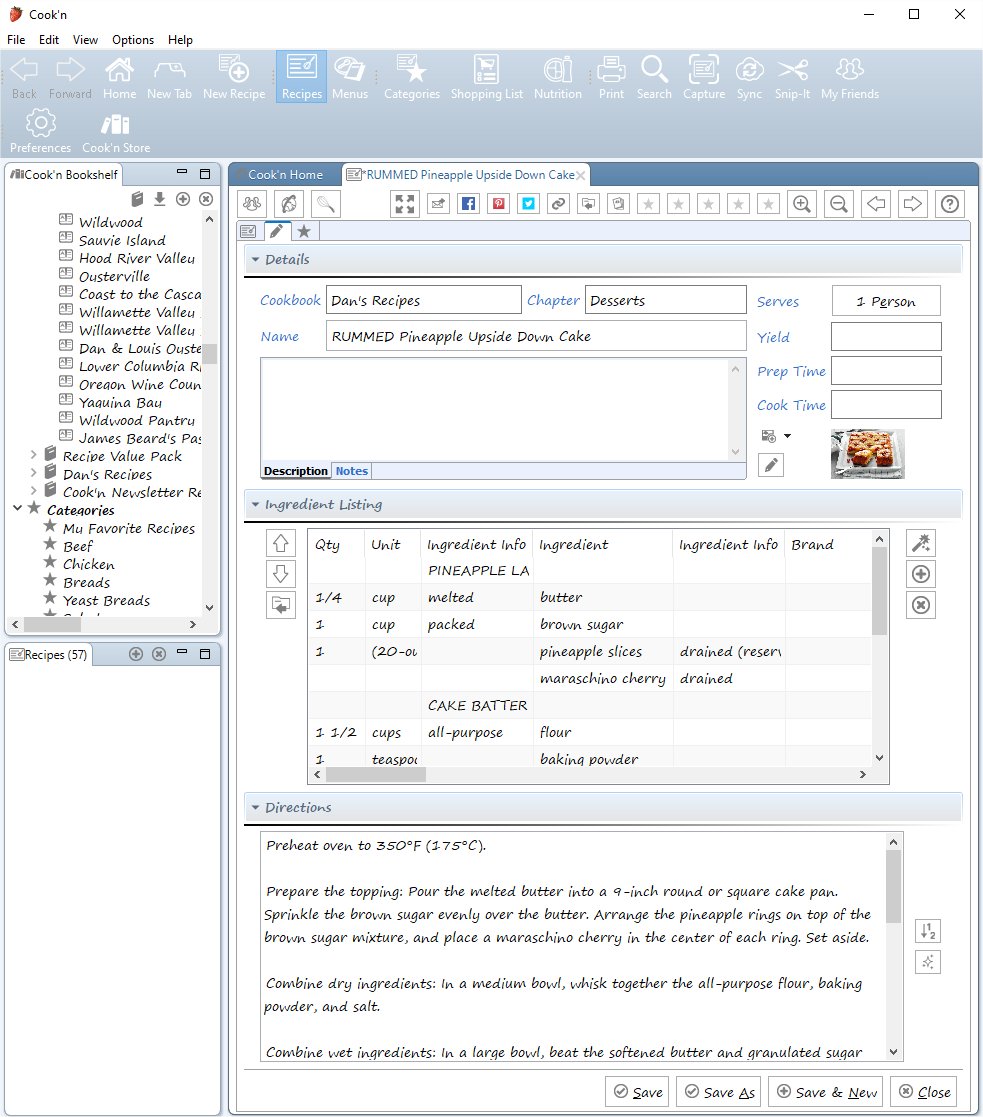
Recently, I switched my Cook’n font to Segoe Print, and wow—it completely changed the vibe of the app. Recipes suddenly felt more handwritten, cozy, and personal… almost like flipping through a favorite family cookbook. I liked it so much that I had to take a screenshot!
There’s no right or wrong choice here. Some fonts feel clean and modern. Others feel warm and homey. The fun part is experimenting until Cook’n feels just right for you.
So go ahead—play around. Change the font. Try something unexpected. You might be surprised how much you enjoy the experience.
And if you haven’t upgraded to Cook’n 16 yet, this is just one more reason to take a look. Sometimes the little touches make the biggest difference.
Happy cooking—and happy customizing!
blog comments powered by Disqus
When we released Cook’n 16 last month, we introduced a small-but-mighty new feature that lets you change the Editor/View Font. At the time, I focused mostly on how increasing the font size can make Cook’n easier on aging eyes (and trust me… I’m grateful for that feature every day 😄).
But there’s another fun side to this new option that I haven’t talked about yet…
🎨 It’s not just about size — it’s about style!
With Cook’n 16, you can also change the font style used throughout the recipe editor and viewer. That means you can give Cook’n a look and feel that matches your personality.Recently, I switched my Cook’n font to Segoe Print, and wow—it completely changed the vibe of the app. Recipes suddenly felt more handwritten, cozy, and personal… almost like flipping through a favorite family cookbook. I liked it so much that I had to take a screenshot!
🔧 How to try it yourself
It’s easy:- Click the Preferences button on the toolbar
- Find Editor/View Font
- Click Change
- Try different fonts until one makes you smile 😊
There’s no right or wrong choice here. Some fonts feel clean and modern. Others feel warm and homey. The fun part is experimenting until Cook’n feels just right for you.
🧡 Make Cook’n your own
This is one of those features that’s all about comfort and enjoyment. When your recipes look the way you like, Cook’n feels less like software and more like your personal kitchen companion.So go ahead—play around. Change the font. Try something unexpected. You might be surprised how much you enjoy the experience.
And if you haven’t upgraded to Cook’n 16 yet, this is just one more reason to take a look. Sometimes the little touches make the biggest difference.
Happy cooking—and happy customizing!
 Dan Oaks
Founder of DVO Enterprises
Creator of Cook'n
Husband of 1. Father of 5. Grandpa of 4.
Monthly Newsletter Contributor since 2024
Email the author! dan@dvo.com